
Concept
Shojiku's author used Thinreports templates for years; at the time it was effectively the only practical way to produce business documents from Rails. It served well. Still, running it meant staying careful about six things, each rooted in the structure of the format. Shojiku is the structure chosen so that none of the six needs care anymore.
There are JS libraries with a similar design. But the author works in Rails and Python, and could not get onto them. So that this does not happen again, Shojiku's engine is written in Rust and usable from any language; each language's SDK just calls that binary.
Looking up usable keys is a chore
A Thinreports layout is built in its designer. A field on the canvas carries an ID, and the Ruby code that fills it references that ID as a string. It looks like this (a simplified example):
{ "type": "s-tblock", "id": "customer_address", "x": 96.0, "y": 153.5 }report.page.item(:customer_address).value(customer.address)Nothing on the code side lists what those IDs are. The set of usable keys lives scattered through the layout file, so whoever writes the filling code opens the designer to check, or consults some other document. Types and sample values are not attached there either.
Reference an ID that does not exist and generating the report raises UnknownItemId. The mistake is caught, but at render time: without a test that actually generates that report, the place it surfaces is production. The other direction is quiet. A field the code never fills renders as a blank with no error, and a field that was never populated is indistinguishable on paper from a field whose data happened to be empty this time, so the last line of defense was somebody eyeballing the PDF.
The answer to both is definitions.yml. The catalog of data items became a file, and a template can only reference keys declared in it. The full list of usable keys is the catalog itself; types, constraints and sample values are right there. A reference to something undeclared becomes an error with a diagnostic code before anything renders. The same check runs at author time, in CI, from the CLI, from the MCP server, and in the Designer, because one engine sits under all five.
Every display form adds another key
A Thinreports field does have a format box. In practice the requests kept going past it — digit grouping, then units, rounding, Japanese-era dates, masked phone numbers — so the Ruby side grew a set of display value objects that formatted each value into a string before handing it to the template. In pseudocode:
# a date value object: writes one key per display form
def render(renderer:, key:)
  renderer.set_value(key,         I18n.l(value, format: '%Y/%m/%d(%a)'))
  renderer.set_value("#{key}_jp", I18n.l(value, format: '%Y年%-m月%-d日(%a)'))
end
Because the result of formatting is a string, every new display form adds a layout key: next to ordered_at sit the Japanese-calendar ordered_at_jp, the date-only ordered_at_date, the masked tel_masked. A few years in, dozens of near-identical keys sat in the layout, and picking the wrong one produced output that still looked plausible.
In Shojiku, formats apply at the moment of display and the value stays a number. Set a currency style on a container once and every amount under it follows; override only where you want something else. The rules are CSS inheritance, and whether a date renders in the Western or the Japanese calendar is a display-side choice too. The key does not multiply. Locale information lives as data in packs/locale/. The same receipt template renders in Japanese, Traditional Chinese, Simplified Chinese and English because currency, dates, tax wording and font fallback swap with the pack; the geometry is untouched. The gallery has the four side by side.
Fix one thing, fix everything
The old format placed every item at absolute coordinates. Like this (again simplified):
{
  "report": { "margin": [25, 25, 25, 25] },
  "items": [
    { "id": "title",    "x": 25, "y": 25, "width": 545, "height": 24 },
    { "id": "customer", "x": 25, "y": 65, "width": 260, "height": 18 },
    { "id": "total",    "x": 25, "y": 91, "width": 260, "height": 32 }
  ]
}
Change the page margin from 25 to 20 and no item moves; walking every item and subtracting 5 from each x and y is your job. Fonts are the same. The box does not grow with the text, so raising the title's font-size means raising its height and shifting every item below it down. None of this is hard work. It is relentlessly tedious, and a slip prints elements on top of each other. "Just move it a little" was always a project.
Shojiku places things relatively, with absolute coordinates reserved for where you want them. The page margin lives in one place, the body stacks top-down, and in a flex row children without a width size themselves to their content.
page: { size: A4, margin: 25 }    # change to 20 and nothing below changes
sections:
  body:
    type: flow                    # stacks top-down
    gap: 16
    items:
      - { type: text, text: INVOICE, style: { fontSize: 24 } }
      - type: container
        box: { direction: row, gap: 8 }
        items:                    # two widthless children -> half each
          - { type: text, text: From }
          - { type: text, text: To }
Changing the margin is one edit. Raise the title's fontSize to 32 and its box grows with the content, pushing everything below down by exactly that much. The defaults are part of the specification: leave out a width and the box takes the width its content needs, leave out a height and it grows with its content. The playground has exactly this behavior under a slider.
Placing a table is a struggle
Tables were a class of their own. The old format's list draws its header, detail and footer as bands, and the items inside the detail band are recorded at canvas coordinates, then mapped into the row by a per-band offset (simplified):
{
  "id": "order_items", "type": "list",
  "detail": {
    "height": 24.1,
    "translate": { "x": 0, "y": -62.4 },
    "items": [
      { "id": "item_name", "x": 30, "y": 352.5, "width": 235, "height": 20 }
    ]
  }
}
The way to read it: y: 352.5 is a page coordinate, and the band's -62.4 maps it into the row. You place things while converting between frames of reference, and it takes several tries to land where you meant. In a document whose line count varies, the page-break arithmetic is yours too.
The other weakness is anything whose height moves. Set a multi-line text to expand on overflow and its box grows downward, but the elements below it do not move; the growth prints over them. Under anything that might grow, all you can do is leave generous blank space.
A Shojiku table is one element in the flow body. Rows come from an array in params, columns without a width split the leftover, and when rows overflow the table breaks to the next page and repeats its header row.
- type: table
  data: { key: order_items }   # rows: an array in params
  repeatHeader: true           # repeat the header row after a page break (default)
  columns:
    - { label: Item, data: { key: name } }
    - { label: Qty, data: { key: quantity }, width: 55 }
    - { label: Amount, data: { key: amount }, width: 95 }
The body stacks top-down, so a three-row table pulls what follows up and a thirty-row one pushes it to the next page. A grown element overlapping the one below cannot happen.
Shared styles are edited element by element
Shared looks — the heading size, the rule color — sat directly on each element, so "make every heading 1pt larger" meant finding every heading and editing every one.
Shojiku has a named styles: registry at the top of the template. It is the same mechanism as the named styles in Google Docs or Word, and you reference an entry by name the way you would a CSS class.
styles:
  title:       { fontSize: 20, fontWeight: bold }
  sub-section: { fontSize: 12, fontWeight: bold, borderWidth: { bottom: 0.5 } }

sections:
  body:
    type: flow
    items:
      - { type: text, text: Billed items, styleNames: [sub-section] }
      - { type: text, text: Payment terms, styleNames: [sub-section] }
Making every heading 1pt larger is one edit to the registry. The elements do not change at all.
A layout file no human could edit
The old format was machine-written XML, effectively read-only for humans. You could not review a layout change in a pull request, and you could not resolve a merge conflict by hand. Asked what changed between two versions, you had no answer. The file was the GUI's output, and the GUI was the only way in.
While a designer sits next to you, that still works. It became the decisive problem when we wanted AI agents to author templates: an agent works by reading and writing text, and that file had nothing to read.
A Shojiku document is two YAML files (the template and the field catalog) plus a JSON file of data. Diffs are readable. Merges work. An agent can read one, change a few lines, render a preview, read the layout tree back, and iterate until the diagnostics are gone. The MCP server exists for that loop. The Designer reads and writes the same files without owning them; the GUI is one way in.
Why now
The reverse of the sixth point is the reason Shojiku exists now. The value of a template being plain text jumped the moment AI agents entered real work. An agent drives validate → preview → inspect through the MCP server and iterates against diagnostic codes; a human looks at the rendered preview. Shojiku is designed with that double-checked loop as the starting assumption; the hero banner on this site was authored through it.
Vertical writing, circled options and checkboxes come built in
In the JS PDF libraries, vertical writing is the kind of request that sits in an open issue for years. Shojiku put this territory in the spec from the start; each piece is one template line plus a params value.
Vertical writing is set with writingMode. Ruby, kinsoku line breaking, hanging punctuation and tate-chu-yoko all set vertically with it.
- type: text
  text: 走れメロス
  style: { writingMode: vertical_rl, fontSize: 16, letterSpacing: 6 }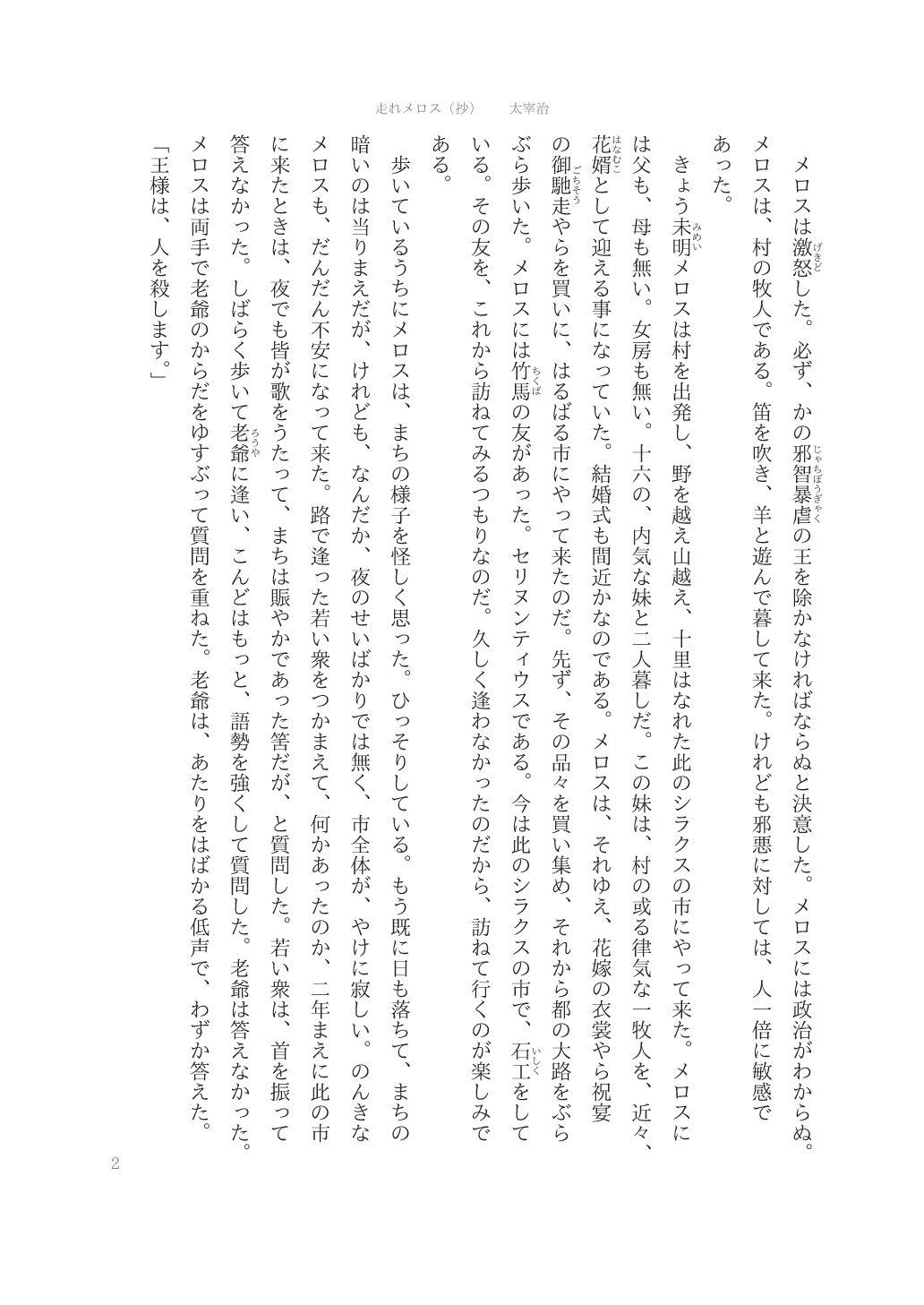
Circling an option is written as mark. The circle lands on the choice whose enum value matches the params.
# templates.yml
- { type: text, text: General, mark: { data: { key: application.category, equals: general } } }
- { type: text, text: Student, mark: { data: { key: application.category, equals: student } } }{ "application": { "category": "student" } }Here "Student" gets the circle.
Checkboxes are type: checkbox. Pass a boolean or a multi-select enum in params and the box is checked.
- { type: checkbox, data: { key: application.agree } }
- { type: checkbox, data: { key: application.contact_methods, equals: email } }{ "application": { "agree": true, "contact_methods": ["email", "mail"] } }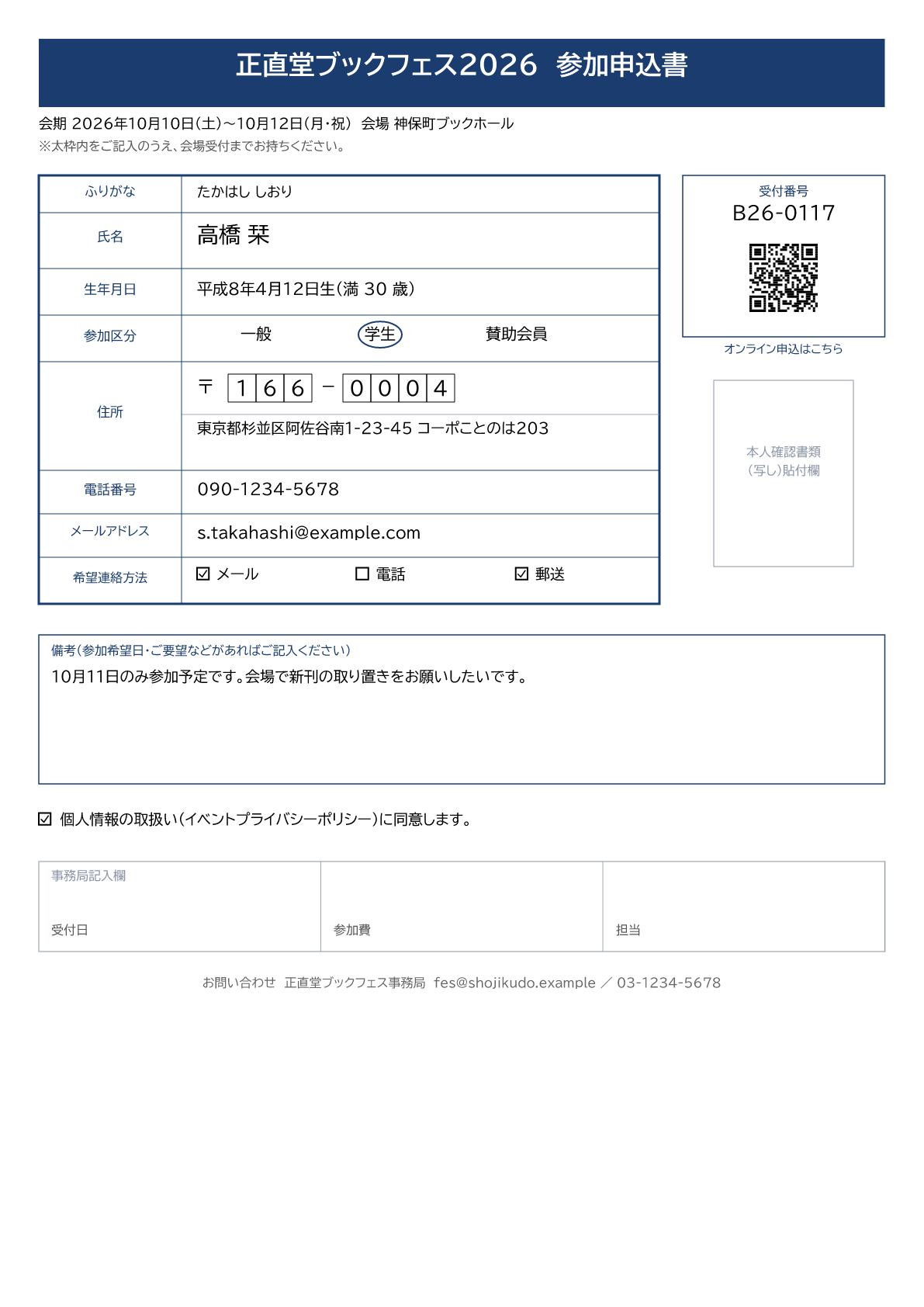
Migrating from Thinreports
There is no .tlf importer. Staying compatible would have carried the points above straight across.
To migrate from Thinreports, use an AI agent with the MCP server. Give the agent a rendered image of the old report and it re-authors the definitions and the template, checking the preview and the diagnostics as it goes. A migration skill, shojiku-thinreports-migrator, ships in the repository (npx skills add kengos/shojiku installs it). The whole procedure is written up in the migration walkthrough, which has been run end to end.